LambdaWidgetsCloudWatch custom widgets in C#, developed on your machine
A widget is a server-rendered application inside the console. This gives you routes, views, tests and charts for one — and a local dashboard that behaves like the console, for a widget in any language.
dotnet new install LambdaWidgets.Templates::0.1.0-rc1000dotnet new lw-logs -n OrdersSearch # a Logs Insights querydotnet new lw-ddb -n OrderLookup # a DynamoDB query, pageddotnet new lw-graph -n OrderMetrics # a chart over CloudWatch metrics
Each gives you a widget, a test project that already passes, and a dashboard.json. Two processes and you are clicking:
bash
dotnet run --project OrdersSearch # the widget, under the AWS Lambda Test Toollambda-widgets --dashboard dashboard.json # the console's side, on http://localhost:5080
The application composes modules. Handlers are ordinary classes in their own files.
csharp
// Pages.cspublic class Pages(ILogQueries queries) { [Get("/")] [Output<Views.LandingPage>] public SearchPage Index([FromWidget] SearchRequest request, IWidgetContext context) => new(request.Query, request.LogGroups, context, Results: null); [Get("/search")] [Output<Views.ResultsPage>] public async Task<SearchPage> Search( [FromWidget] SearchRequest request, IWidgetContext context, CancellationToken cancellationToken) { // The dashboard's range rather than a form field, so the widget covers the window the // viewer is looking at and follows them when they zoom it. var (start, end) = context.TimeRange.Effective; var results = await queries.Run( request.LogGroups, request.Query, start, end, request.Limit, cancellationToken); return new SearchPage(request.Query, request.LogGroups, context, results); }}
@Widget.Button writes the cwdb-action element the console binds a click to. Links.Pages.Search() is generated from the handler above, so renaming Search fails this line during the build rather than shipping a button that silently does nothing.
Open it, fill a field, click by the text on screen. No route, no payload, no JSON — a viewer can name none of those. It runs in process through the real invocation handler: no test tool, no harness, no AWS account.
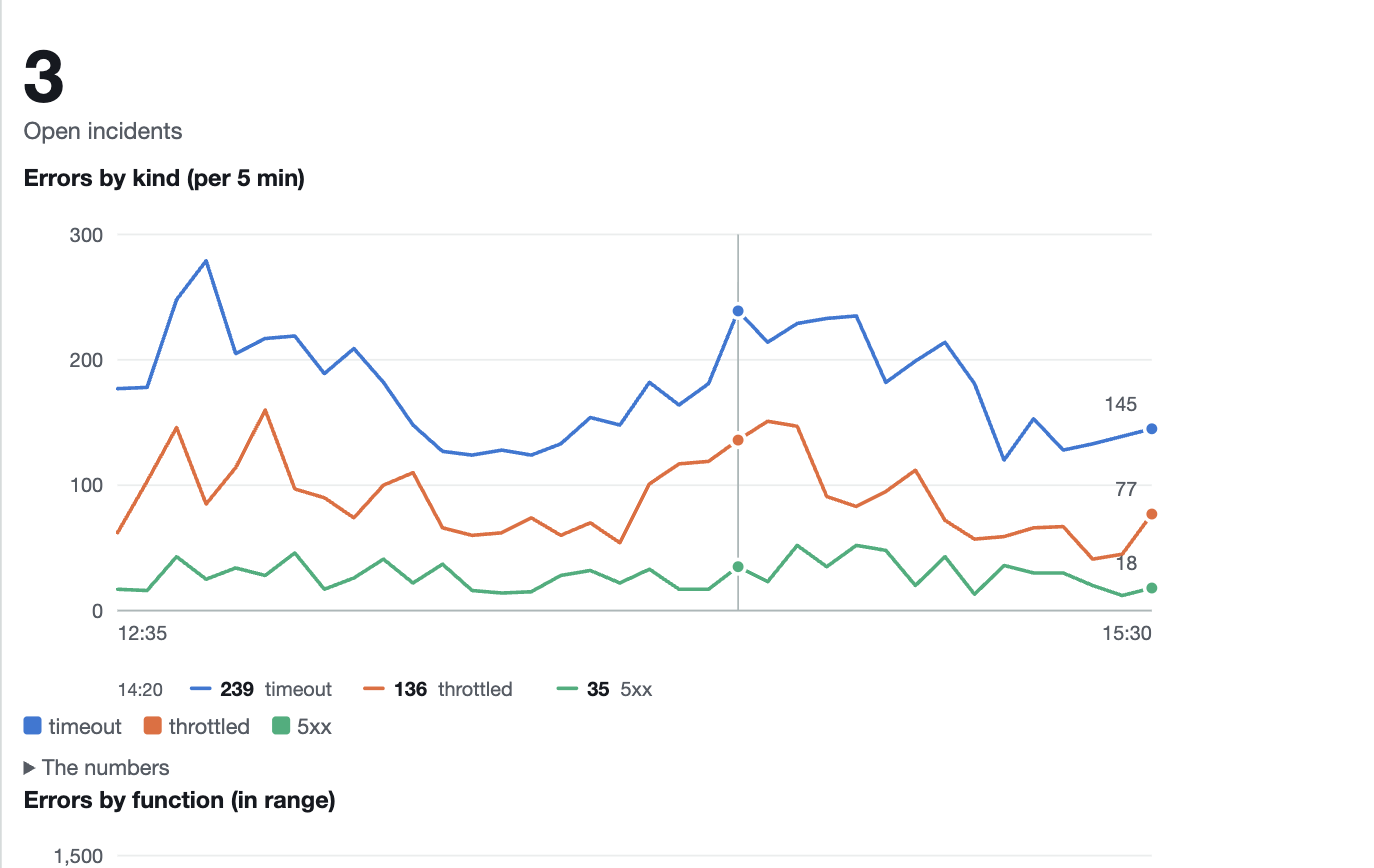
Chart.Over("Errors by kind", timeouts, throttled, serverErrors).In("per 5 min")
The console strips JavaScript, so the chart arrives as SVG drawn on the server. Point at a moment and a hairline marks it with every series' value under the axis — CSS :hover and :focus-within, no script. Colours are validated for both console themes, and every number is in a table under the chart, so nothing is hover-only.
lambda-widgets runs the console's side of the contract on your machine. It builds the same event, parses the HTML your function returns, interprets cwdb-action the way the console does, applies the same sanitizer, and lays the widgets out on the same 24-column grid.
It also shows you three things a real dashboard never will: the event it sent, what the sanitizer removed before rendering, and why a button does nothing.
Your function does not know the difference. The harness speaks the Lambda Invoke API, so it drives the AWS Lambda Test Tool, the runtime interface emulator, sam local, or a deployed function — and your widget can be written in any language. There is an HTTP API for driving a click-through from Python or Node.
A CloudWatch custom widget is a dashboard widget backed by a Lambda function. The dashboard invokes the function, the function returns HTML, and a cwdb-action element in that HTML re-invokes it when the user clicks. One widget is a whole server-rendered application inside the console: a landing page, a form, a result, a link to the next tool. The function's execution role decides what the tool may do, and IAM on the dashboard decides who may use it.
Developing one otherwise means deploying a Lambda, opening a dashboard, clicking, reading a log, and editing. There is no local loop for it in any language, the official samples are Python and JavaScript scripts, and nobody has written a framework for it.
The console contract reference writes down what AWS documents across four pages and a samples repository. It describes CloudWatch as it behaves today and is worth reading whether or not you use anything here.